01
Download the official app
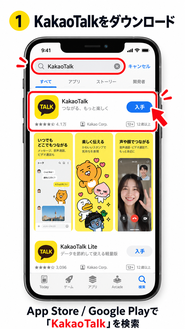
Search for “KakaoTalk” in the App Store or Google Play. Choose “KakaoTalk : Messenger” and check that the publisher is Kakao.
BEFORE YOU FLY / KAKAOTALK
Before travelling to Korea, complete the setup in your home country. You can register with your existing mobile number and its country code. A Korean phone number is not required.
Register and contact us at least 2 days before your programme
From airport arrival messages to schedule changes and emergencies during your stay, KakaoTalk is ACOPIA’s official communication channel.
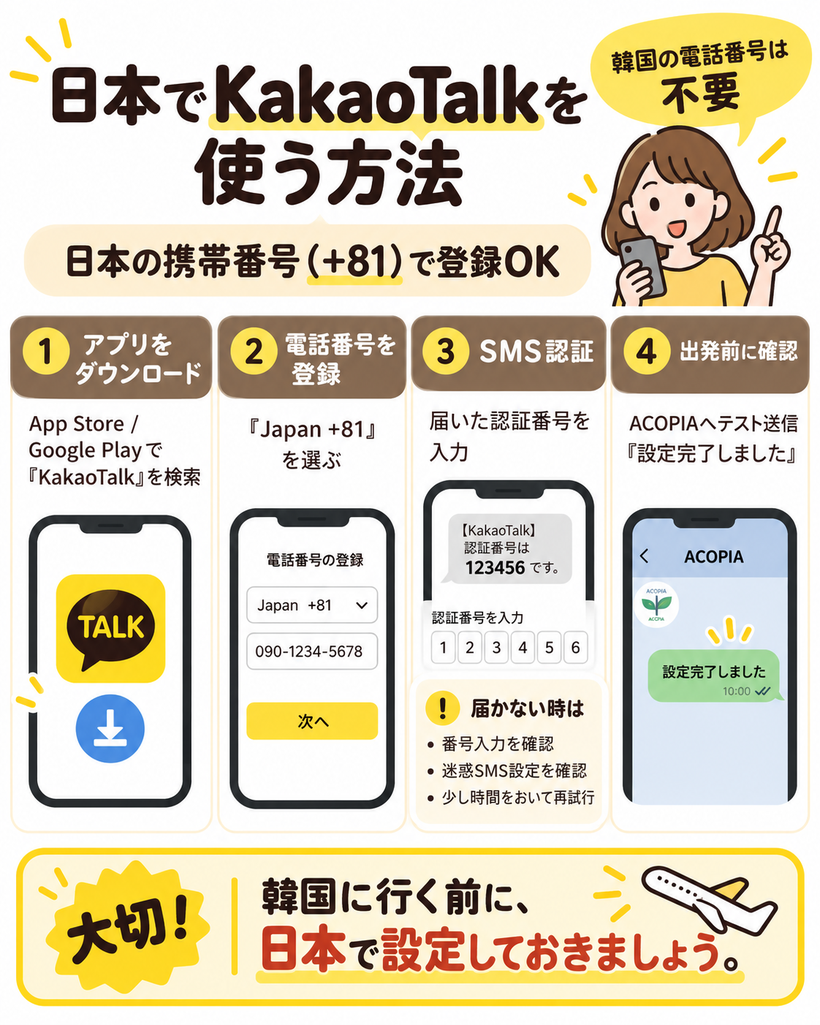
SET UP BEFORE DEPARTURE
Register with your own mobile number, verify it by SMS, set your profile and send a test message. The images show a Japanese example; use the country code for your own number, not automatically +81.
The retained illustrations are in Japanese; each step has an English explanation below. Screens may differ by app version or device. Names, phone numbers and verification codes in the pictures are examples—enter your own details and the code you actually receive.
Search for “KakaoTalk” in the App Store or Google Play. Choose “KakaoTalk : Messenger” and check that the publisher is Kakao.
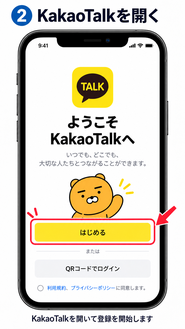
Open the app and follow the on-screen instructions to start registration.
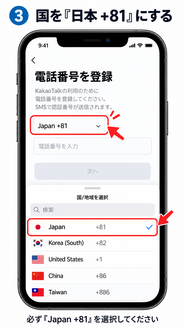
Select the country code belonging to your mobile number. Japan +81 is only the example shown in the picture. You do not need to obtain a Korean +82 number.
Enter the mobile number you currently use in your home country, following the format requested on screen. Check it carefully for typing errors.
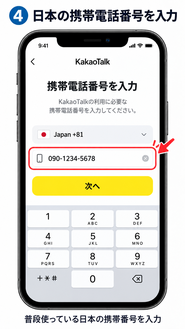
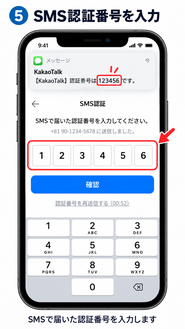
Enter the verification code sent by SMS to your registered number. Complete SMS verification before leaving for Korea.
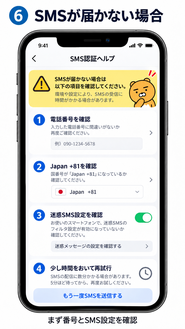
Check the country code, number and international SMS settings. Avoid repeated requests in a short time; wait before trying again. See the troubleshooting section below.
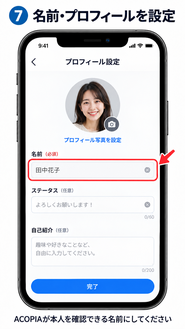
Use your real name or a name that lets ACOPIA staff identify you. Set your profile photo as well.
Send “I have finished setting up KakaoTalk. My name is [your name].” to the KakaoTalk contact provided separately by ACOPIA. Setup is complete when you receive a reply from staff.
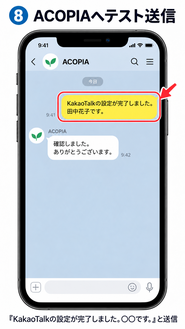
Contact us from the participant’s own KakaoTalk account, not a parent’s or guardian’s account. Check the designated contact before sending.
TROUBLESHOOTING
Select the country code for the number you actually use. Do not select Korea +82 unless you are registering a Korean number. Check every digit.
Your mobile carrier may block messages from overseas. Check its international SMS and spam-filter settings.
Repeated attempts may trigger a temporary security restriction. Wait a while before trying again.
If Wi-Fi is not working, try mobile data. If mobile data is unstable, try Wi-Fi instead.
STAY CONNECTED
From two days before the programme and throughout your stay, routine messages, meeting times, schedule changes and emergency notices are generally sent through the participant’s own KakaoTalk account. Communication through a parent or guardian cannot replace this.
Keep KakaoTalk available to receive messages and check it regularly.
We send individual messages when a response is required. Even if you cannot answer in detail, acknowledge receipt within 30 minutes of checking the message.
If you repeatedly do not reply, we may consider communication unsuccessful and stop sending individual messages.
You do not need to reply unless asked, but read all group messages carefully so you do not miss important information or emergency announcements for everyone.
You do not need to change your registered home-country number to a Korean number after arrival. With an internet connection—Wi-Fi, international roaming or a Korean SIM/eSIM—you can use KakaoTalk messages and calls.
Some services, such as Korean domestic identity verification, may require a Korean mobile number.
READY TO GO
Do not wait until you reach the airport in Korea to set up the app.
You could encounter problems with SMS, phone verification, login or airport Wi-Fi. KakaoTalk is also used for arrival messages if you book airport pickup, so complete setup before you travel.
MORE HELP